Best Budget Webcams Under $50 for Work From Home (2026)
Last updated: May 2026
Your laptop's built-in webcam makes you look like you're in witness protection. These picks cost less than a dinner out and look ten times better.
Editor's Note
“My laptop webcam made me look like I was testifying before Congress via satellite link from 1994. Two years of Zoom calls. Two years. Never again — these $40 cameras will make you look like you actually tried.”
— The TotalTechPicks Team
Filter by Price
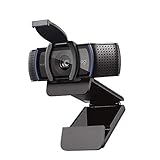
1080p/30fps Full HD with automatic light correction and dual mics. The gold standard for home office video calls — used by millions of streamers and remote workers.
✓ Pros
- ✓ Crystal-clear 1080p
- ✓ Auto light correction
- ✓ Built-in privacy shutter
✗ Cons
- ✗ No 4K
- ✗ Fixed focus
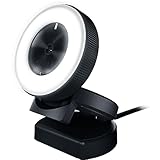
1080p webcam with a built-in adjustable ring light — no extra lighting gear needed for a professional look on dark mornings.
✓ Pros
- ✓ Built-in ring light
- ✓ Plug-and-play
- ✓ Great in low light
✗ Cons
- ✗ Bulkier than competitors
- ✗ Ring light non-removable

2K Sony sensor, dual noise-cancelling mics, AI auto-framing. Looks better than cameras twice the price — ideal for anyone doing Zoom calls daily.
✓ Pros
- ✓ 2K Sony sensor
- ✓ AI auto-framing
- ✓ Dual noise-cancelling mics
✗ Cons
- ✗ Not 4K
- ✗ Less brand recognition
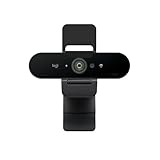
True 4K/30fps with HDR, 5x digital zoom, and dual mics. If you do serious streaming or high-stakes video meetings, this is the best webcam money can buy under $200.
✓ Pros
- ✓ True 4K HDR
- ✓ 5x digital zoom
- ✓ Works with Windows Hello
✗ Cons
- ✗ Pricey
- ✗ 4K requires USB 3.0 port

Elgato Facecam Pro 4K Webcam
4K@60fps with a large Sony STARVIS sensor and fixed-focus prime lens. No software nonsense — full manual exposure controls baked into the hardware. The streamer's webcam.
✓ Pros
- ✓ 4K@60fps
- ✓ Sony STARVIS sensor
- ✓ Full manual controls
✗ Cons
- ✗ Very expensive
- ✗ No autofocus (intentional)

Insta360 Link AI Webcam 4K
A gimbal-stabilized 4K webcam that physically tracks your face as you move. Whiteboard mode, overhead mode, and DeskView mode let you show your space uniquely.
✓ Pros
- ✓ AI gimbal tracking
- ✓ 4K quality
- ✓ Whiteboard & desk modes
✗ Cons
- ✗ Mechanical gimbal can lag slightly
- ✗ USB-C only (needs adapter for older PCs)

True-to-life color, 1080p@30fps, certified for Teams/Zoom/Skype. If you live in Microsoft 365, this webcam was built for you with HDR and Teams certification.
✓ Pros
- ✓ Teams/Zoom certified
- ✓ HDR support
- ✓ Clean simple design
✗ Cons
- ✗ No 4K
- ✗ No dedicated software

4K Sony sensor, built-in ring light with 3 warmth levels, AI background removal, and a wide 95° FOV. The 'bring a studio to every call' webcam at a reasonable price.
✓ Pros
- ✓ 4K + built-in ring light combo
- ✓ AI background removal
- ✓ 95° wide angle
✗ Cons
- ✗ Ring light can wash out in bright rooms
- ✗ Software can be finicky

1080p@30fps, dual stereo noise-reducing mics, plug-and-play on any OS. When you just need a decent webcam and don't want to spend more than a pizza — this is it.
✓ Pros
- ✓ Under $30
- ✓ Plug-and-play
- ✓ Dual noise-reducing mics
✗ Cons
- ✗ Average in low light
- ✗ No autofocus
Buying Guide — What to Look For
1080p is minimum; 2K is the sweet spot
1080p/30fps is perfectly adequate for Zoom and Teams. 2K looks noticeably sharper and is worth the $10-20 premium. 4K is overkill unless you're recording high-production YouTube content.
Lighting matters more than resolution
A $30 webcam in good lighting beats a $200 webcam in dim light every time. If your desk faces away from a window, get a ring light or the Razer Kiyo with built-in lighting before spending on 4K.
Autofocus vs fixed focus
Cheap webcams use fixed focus — fine if you sit still. Autofocus (like on the C920s) adjusts when you lean in or move. Worth it if you gesture a lot on calls or shift position.
Field of view matters for your setup
A 78° FOV is standard for one person. 90°+ FOV is great if you have a home office backdrop you want to show. Too wide and your room looks like a fish-eye lens disaster.
Our Verdict
The Logitech C920s is the camera of record — millions of people use it, and there's a reason. But honestly? Get the Anker C200 2K if you're buying today. Better sensor, AI framing, and it makes you look like you care about your job. Which you do. Probably.
Was this helpful? Share it.
← Back to all picks