Best Streaming & Content Creator Gear (2026)
Last updated: May 2026
Great content doesn't need a $10,000 studio. A few hundred dollars of the right gear turns your desk into a broadcast setup. Here's exactly what to buy and in what order.
Editor's Note
“I watched a streamer with a $30 mic and 720p webcam who had 50,000 concurrent viewers, and a creator with a $3,000 setup who had 12. Gear matters less than you think — but bad audio will make people leave immediately. Fix that first.”
— The TotalTechPicks Team
Filter by Price
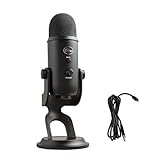
The most popular USB mic in the world. Cardioid, omnidirectional, and stereo pickup patterns. Plug-and-play, no audio interface needed. The starter mic for every streamer and podcaster.
✓ Pros
- ✓ Three pickup patterns
- ✓ Plug-and-play USB
- ✓ Onboard headphone monitoring
✗ Cons
- ✗ Large footprint
- ✗ Picks up keyboard noise without acoustic treatment
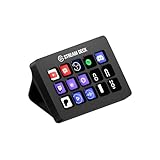
15 customizable LCD keys that control OBS, Twitch, YouTube, Spotify, and anything else with one touch. Once you use a Stream Deck, you can never go back.
✓ Pros
- ✓ Completely customizable LCD keys
- ✓ Works with 300+ apps
- ✓ Transform productivity (not just streaming)
✗ Cons
- ✗ Software can be buggy
- ✗ Learning curve for non-streamers
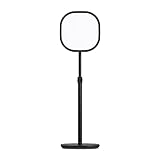
2800 lumens, 2900K–7000K tunable, app + stream deck controlled. The professional light every streamer and content creator recommends — because it makes you look like a pro.
✓ Pros
- ✓ 2800 lumens professional brightness
- ✓ App & Stream Deck control
- ✓ No glare design
✗ Cons
- ✗ Needs desk or stand mount
- ✗ WiFi required for app control

Elgato HD60 X Capture Card
4K30 / 1080p60 HDR10 capture from any console. Plug PS5, Xbox Series X, or Switch into your PC stream with zero lag passthrough. The capture card for every console streamer.
✓ Pros
- ✓ 4K HDR capture
- ✓ Zero-latency passthrough
- ✓ Works with PS5/Xbox/Switch
✗ Cons
- ✗ 4K capture requires a fast PC
- ✗ No 4K60 capture (for that, go HD60 Pro)

Studio-quality condenser mic in a super-compact body with built-in magnetic desk stand. RØDE's legendary broadcast audio in a plug-and-play USB form. Sounds insanely good for the price.
✓ Pros
- ✓ Studio condenser quality
- ✓ Magnetic desktop stand included
- ✓ Ultra-compact
✗ Cons
- ✗ No gain knob (software only)
- ✗ Cardioid only — no pattern switching
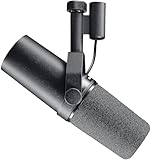
The microphone on Joe Rogan's desk. Michael Jackson recorded Thriller on it. Now you can podcast on it. Broadcast-quality cardioid dynamic mic with an air suspension shock mount. The final mic you'll ever buy.
✓ Pros
- ✓ Broadcast-grade audio quality
- ✓ Legendary microphone
- ✓ Extremely durable
✗ Cons
- ✗ Requires audio interface (XLR only)
- ✗ Needs gain (low output)
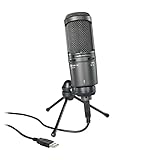
Cardioid condenser studio mic with headphone monitoring, mix control, and USB plug-and-play. Flat natural response that makes podcasts sound expensive without an audio interface.
✓ Pros
- ✓ Studio condenser quality
- ✓ Headphone monitor with mix knob
- ✓ Plug-and-play
✗ Cons
- ✗ Cardioid only
- ✗ Large — needs a proper arm

8 LCD keys plus 4 touch strips with rotary dials. Control audio levels, switch scenes, and adjust any parameter without taking eyes off your stream. Content creator command center.
✓ Pros
- ✓ Touch dials for audio control
- ✓ LCD key customization
- ✓ Works with 300+ apps
✗ Cons
- ✗ Very expensive
- ✗ Software complexity for casual users

4K@60fps HDR10 capture, 4K@144fps pass-through, no encoding required (hardware H.265). The internal PCIe capture card for the serious streamer who doesn't want any bottleneck.
✓ Pros
- ✓ 4K@60fps HDR capture
- ✓ Hardware encoding (no CPU tax)
- ✓ 4K144fps pass-through
✗ Cons
- ✗ Internal PCIe (needs desktop)
- ✗ Higher driver sensitivity

Logitech MX Brio 705 4K Webcam
4K, AI-enhanced framing, 90° wide view, USB-C, built-in privacy shutter, and support for any meeting platform. Logitech's flagship designed for remote workers who want to be seen properly.
✓ Pros
- ✓ 4K AI framing
- ✓ Wide 90° lens
- ✓ Privacy shutter
✗ Cons
- ✗ Very expensive for a webcam
- ✗ 4K drops to 1080p without USB3 port

Plug-and-play USB cardioid mic with a pop filter, scissor arm stand, and shock mount all included. Sounds noticeably better than built-in laptop mics at a price that removes all excuses.
✓ Pros
- ✓ Everything included in box
- ✓ Plug-and-play
- ✓ Under $30
✗ Cons
- ✗ Budget condenser capsule
- ✗ Stand not very stable
Buying Guide — What to Look For
Audio quality is the #1 thing viewers notice
Terrible video — viewers stay. Terrible audio — viewers leave. Fix your microphone before anything else. A $30 USB mic in a treated room sounds better than a $300 mic in a reverb-filled concrete box.
Lighting before camera
A properly lit room makes a $40 webcam look professional. Buy a key light before upgrading your camera. Natural light facing your face is the free solution. The Elgato Key Light is the paid version of that principle.
Acoustic treatment matters more than mic brand
Soft surfaces absorb sound. Hard surfaces reflect it. Before spending on a new mic, add a rug, hang curtains, put your bookshelf behind your setup. Your existing mic will immediately sound better.
Build your stream slowly: software is free
OBS Studio is free. Streamlabs is free. The Stream Deck is a 'nice to have,' not a 'need to have.' Start with your computer, a decent mic, and OBS. Add hardware as your channel grows.
Our Verdict
The Blue Yeti is the gateway mic — start here. Then get the Elgato Key Light because it's the single biggest visual quality jump you can make. The Stream Deck is for when you're serious. And the SM7B is for when you're very serious, and have a Focusrite Scarlett Solo sitting next to it.
Was this helpful? Share it.
← Back to all picks