
Best USB-C Hubs Under $50 in 2026
Last updated: May 2026
Modern laptops ship with fewer ports than ever. A good USB-C hub solves that instantly — and you don't need to spend $100+ to get one that works great.
Editor's Note
“I bought my first USB-C hub by picking the cheapest one on Amazon. It made a concerning smell after 20 minutes and I never saw my files again. These won't do that.”
— The TotalTechPicks Team
Filter by Price
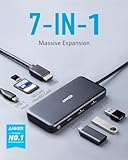
Turn one USB-C port into seven: 4K HDMI, 100W Power Delivery, SD/microSD readers, and two USB-A 3.0 ports. Compact enough to toss in a laptop bag.
✓ Pros
- ✓ Compact & travel-friendly
- ✓ 100W PD pass-through
- ✓ 4K@30Hz HDMI
✗ Cons
- ✗ No Ethernet
- ✗ Gets slightly warm under heavy load

Nine ports in one compact hub: dual display (HDMI + VGA), Gigabit Ethernet, 3.5mm audio, SD card, and three USB-A ports. Perfect for power users.
✓ Pros
- ✓ Dual display support
- ✓ Gigabit Ethernet
- ✓ Wide compatibility
✗ Cons
- ✗ Slightly bulkier
- ✗ Needs PD host for max charging

Ultra-slim 7-in-1 hub with 4K HDMI, 100W PD, USB 3.0 ports, SD/TF reader. The best value pick for basic multi-port needs.
✓ Pros
- ✓ Best value
- ✓ Ultra-slim design
- ✓ Universal compatibility
✗ Cons
- ✗ HDMI 30Hz at 4K
- ✗ SD reader USB 2.0 speed

The ultimate budget docking hub: dual 4K HDMI, 100W PD, USB-A/C 3.0, Gigabit Ethernet, SD/TF, 3.5mm audio. Replace your entire desk cable mess.
✓ Pros
- ✓ Dual 4K HDMI out
- ✓ 13 ports total
- ✓ Works with MacBook & PC
✗ Cons
- ✗ No Thunderbolt
- ✗ Gets warm with full load

18 ports including 2.5G Ethernet, 3 USB4 Gen2 ports, SD/microSD, DisplayPort, 3.5mm, and 98W laptop charging. The dock that creative professionals drool over.
✓ Pros
- ✓ 18 ports total
- ✓ Thunderbolt 4 bandwidth
- ✓ 98W laptop charging
✗ Cons
- ✗ Expensive
- ✗ Requires Thunderbolt 4 host port

Thunderbolt 4, dual 4K@60Hz display, 10Gbps USB-A, 2.5G Ethernet, 100W PD. Anker quality meets professional docking station at a reasonable price.
✓ Pros
- ✓ Thunderbolt 4 certified
- ✓ Dual 4K@60Hz
- ✓ Anker reliability
✗ Cons
- ✗ Premium price for a hub
- ✗ Large desktop footprint

Gorgeous Space Gray or Silver aluminum hub that matches your MacBook perfectly. 4K HDMI, USB-C PD, USB-A 3.0, and SD/microSD. Looks like it ships with your laptop.
✓ Pros
- ✓ MacBook color-matching design
- ✓ Premium aluminum build
- ✓ Slim & travel-ready
✗ Cons
- ✗ No Ethernet
- ✗ HDMI 4K@30Hz max

Dual HDMI outputs, 4x USB-A, Gigabit Ethernet, 100W PD, SD/TF — in one slim unit. Plugable's legendary tech support makes this the safe choice for buyers who hate surprises.
✓ Pros
- ✓ Dual HDMI
- ✓ Plugable's excellent support
- ✓ 11 ports
✗ Cons
- ✗ Not Thunderbolt
- ✗ Dual HDMI requires DisplayLink driver

Only 8mm thin — the flattest hub you can buy. 4K HDMI, 100W PD, USB 3.0 x2, SD/TF. Slides into any bag and barely takes up desk space.
✓ Pros
- ✓ Ultra-thin 8mm design
- ✓ Great value
- ✓ Runs cool
✗ Cons
- ✗ No Ethernet
- ✗ Moderate transfer speeds
Buying Guide — What to Look For
Power Delivery: Don't go below 85W
USB-C hubs that advertise '100W PD' often pass through 85W or less after powering their own ports. For a MacBook Pro 14", you need at least 85W to charge under load. Check the spec sheet.
4K or 1080p? Know your HDMI version
4K@30Hz is fine for productivity. 4K@60Hz requires HDMI 2.0 — and most budget hubs cap out at 30Hz for 4K. If you need 4K60 for video editing, filter for HDMI 2.0 specifically.
Beware of thermal throttling
A hub running 8+ ports simultaneously generates real heat. Look for aluminum shells (heat dissipation) and reviews mentioning 'gets warm' vs 'gets hot.' Warm is normal; hot means data corruption risk.
Check your laptop's USB-C spec
Not all USB-C ports are created equal. Thunderbolt 4 > USB4 > USB 3.2 Gen 2 > USB 3.2 Gen 1. If your hub advertises 10Gbps speeds, your laptop port needs to support that spec or you're leaving speed on the table.
Our Verdict
Any of these hubs will fix the port problem your thin laptop created. Start with the Anker 7-in-1 — it's the right balance of price, performance, and trust. Step up to the Baseus 13-in-1 only if you genuinely need dual displays. And please, spend the $28. The $8 hub from an unpronounceable brand is not worth your data.
Was this helpful? Share it.
← Back to all picks