
Best Budget Gaming Gear Under $50 (2026)
Last updated: May 2026
You don't need to spend $200 on a gaming mouse to dominate. These picks deliver real gaming performance at a fraction of the price.
Editor's Note
“I used a $5 office mouse for my first year of PC gaming and wondered why I kept losing. Spoiler: it had 800 DPI and a scroll wheel that double-registered twice per session. Don't be me. These picks are real.”
— The TotalTechPicks Team
Filter by Price

6400 DPI optical sensor, ergonomic right-hand design, 5 programmable buttons, 10M click lifespan. The best gaming mouse under $30 — full stop.
✓ Pros
- ✓ Best-in-class sensor
- ✓ Ergonomic all-day comfort
- ✓ 10M click lifespan
✗ Cons
- ✗ Right-hand only
- ✗ Basic RGB
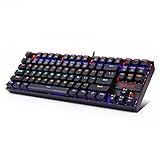
Tenkeyless mechanical keyboard with tactile blue switches, red LED backlight, and splash-proof design. Delivers a premium typing feel at a budget price.
✓ Pros
- ✓ Satisfying tactile keys
- ✓ Compact TKL layout
- ✓ Splash-proof
✗ Cons
- ✗ Blue switches are loud
- ✗ No wireless option

Lightweight 275g headset with 50mm directional drivers, swivel-to-mute mic, and memory foam cushions. Sounds twice as good as the price suggests.
✓ Pros
- ✓ Super lightweight
- ✓ Great sound for price
- ✓ Swivel-to-mute mic
✗ Cons
- ✗ No wireless
- ✗ No surround sound

App-controlled, music-syncing, 16-million-color LED strips. Cover your desk, shelves, or entire room in RGB glory — and yes, your PC runs faster with more RGB.
✓ Pros
- ✓ App + voice control
- ✓ Music sync mode
- ✓ Super easy to install
✗ Cons
- ✗ Adhesive weakens over time
- ✗ Requires 2.4GHz WiFi

26,000 DPI Focus+ sensor, 11 programmable buttons, Chroma RGB underglow, and a tilting scroll wheel with smart reel. This is as good as gaming mice get under $50.
✓ Pros
- ✓ 26K DPI Focus+ sensor
- ✓ 11 programmable buttons
- ✓ Tilting scroll wheel
✗ Cons
- ✗ Right-hand only
- ✗ RGB drains battery if wireless
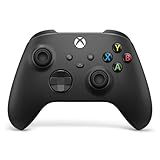
Xbox Wireless Controller
The most comfortable controller ever made works on PC, Xbox, Android, and iOS. Hybrid d-pad, USB-C charging, textured grip. Game Pass subscribers, this is your PC companion.
✓ Pros
- ✓ Best ergonomics in gaming
- ✓ Works on PC + mobile
- ✓ USB-C charging
✗ Cons
- ✗ No rechargeable battery included
- ✗ Lacks back buttons
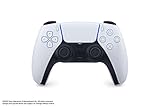
Haptic feedback and adaptive triggers that actually simulate texture, resistance, and tension. PC-compatible via USB or Bluetooth. The most innovative controller in gaming right now.
✓ Pros
- ✓ Haptic feedback & adaptive triggers
- ✓ Works on PC
- ✓ Best-in-class immersion
✗ Cons
- ✗ Battery life shorter than Xbox
- ✗ Haptics drain battery faster

60% layout, Cherry MX switches, per-key RGB, USB-C, and 8000Hz polling rate. The competitive gamer's keyboard — tiny footprint, huge mouse pad real estate.
✓ Pros
- ✓ 8000Hz polling (insane precision)
- ✓ 60% = massive mouse space
- ✓ Cherry MX switches
✗ Cons
- ✗ No F-row or arrow keys
- ✗ Learning curve for 60% layout

HERO 25K sensor, lightspeed wireless, unique hybrid optical-mechanical switches for zero debounce delay, and Lightsync RGB. Heavy at 89g — but that's part of the feel.
✓ Pros
- ✓ HERO 25K sensor
- ✓ Lightspeed sub-1ms wireless
- ✓ Optical-mechanical switches
✗ Cons
- ✗ Heavier than competition (89g)
- ✗ Not for minimalist mouse fans

38hr battery, multipoint Bluetooth, retractable ClearCast Gen2 mic, and compatibility with PS5, Xbox, PC, and Switch. The best mid-range wireless headset on the market.
✓ Pros
- ✓ 38hr battery
- ✓ ClearCast mic clarity
- ✓ Works across all platforms
✗ Cons
- ✗ No ANC
- ✗ Mic not detachable

Elgato Ring Light — 2500 Lumens
18" ring light with 2500 lumens, 2700–6900K color temperature, and Elgato Control Center + Stream Deck support. Set it once, never think about your lighting again.
✓ Pros
- ✓ 2500 lumens professional brightness
- ✓ Stream Deck integration
- ✓ App control
✗ Cons
- ✗ Requires separate stand or mount
- ✗ Premium price
Buying Guide — What to Look For
DPI isn't skill, but sensor quality is
A good optical sensor (like Razer's 5G series) tracks accurately at every DPI setting. Cheap sensors mis-track on certain surfaces and 'spin out' at high speed. The Razer DeathAdder has a legitimate gaming sensor for $30. That's the threshold.
Mechanical switches: tactile vs linear vs clicky
Blue switches = tactile + clicky. Red switches = linear, smooth, quiet. Brown switches = tactile bump, no click. For gaming, reds or browns. For typing feel, blues or browns. Blues will annoy your roommates.
Headset: 50mm drivers is the budget floor
Cheap headsets use tiny drivers that sound like a phone speaker. 50mm drivers (like HyperX Cloud Stinger) produce real spatial audio for gaming. This is why $10 headsets sound terrible.
RGB is optional; build quality is not
Every product in this category has RGB. But more important is whether the thing feels solid. Wobbly scroll wheels and keys that stick are deal-breakers. RGB on a bad product is a distraction tactic.
Our Verdict
The holy trinity under $50: Razer DeathAdder ($30), Redragon K552 ($43), HyperX Cloud Stinger ($40). Grab all three and your setup instantly becomes more capable than 80% of casual gamers. Add the Razer Basilisk V3 if you want the absolute best mouse under $50.
Was this helpful? Share it.
← Back to all picks