
Best Desk Accessories Under $50 to Upgrade Your Home Office (2026)
Last updated: May 2026
You don't need a $5,000 standing desk setup to have a great workspace. A few well-chosen accessories under $50 can transform a cluttered desk.
Editor's Note
“My desk used to look like a cable manufacturer exploded on it. Monitor at table height. Phone nowhere to be found. Now it's basically a productivity shrine and I take Zoom calls standing up like a functional adult. It cost about $80 in total to fix.”
— The TotalTechPicks Team
Filter by Price

Aluminum adjustable desktop holder with 270° angle adjustment. Works with any phone 4–8 inches. Clean, sturdy, and makes a big ergonomic difference.
✓ Pros
- ✓ Sturdy aluminum build
- ✓ 270° adjustment
- ✓ Works with cases
✗ Cons
- ✗ No tablet support
- ✗ Shows fingerprints
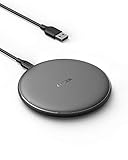
Qi-certified 15W fast wireless charger with sleep-friendly LED and a non-slip surface. Works through phone cases up to 5mm thick.
✓ Pros
- ✓ 15W fast charge
- ✓ Works through cases
- ✓ Sleep-friendly LED
✗ Cons
- ✗ Adapter not included
- ✗ Single device only

Stick-on magnetic clips that corral all your cables on desk or monitor. Install in seconds, never lose a cable again.
✓ Pros
- ✓ 10-second setup
- ✓ Holds multiple cable types
- ✓ Dirt cheap
✗ Cons
- ✗ Adhesive weakens on textured surfaces

Ergotron LX Desk Monitor Arm
The best monitor arm money can buy. Buttery smooth tilt, pan, and height adjustment for monitors up to 34" and 25 lbs. Every ergonomist recommends this arm.
✓ Pros
- ✓ Silky smooth movement
- ✓ Holds up to 25 lbs / 34"
- ✓ Frees up major desk space
✗ Cons
- ✗ Premium price
- ✗ Requires 2 inches of desk edge

BenQ ScreenBar Monitor Light
Clip-on monitor light that illuminates your desk without screen glare. Auto-dimming sensor, 2700K–6500K color temp, and a desktop dial controller. Desk game changer.
✓ Pros
- ✓ Zero screen glare
- ✓ Auto-brightness sensor
- ✓ Desktop dial controller
✗ Cons
- ✗ Requires USB power
- ✗ Wide monitors may need 2

Smart Illumination that auto-adjusts to your lighting, flow multi-device switching, USB-C charging, and perfectly sculpted keys. The keyboard your hands deserve.
✓ Pros
- ✓ Smart backlight auto-adjust
- ✓ Flow multi-device
- ✓ Satisfying sculpted keys
✗ Cons
- ✗ No mechanical key feel
- ✗ Expensive for membrane
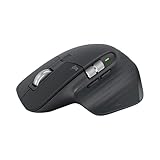
8000 DPI Darkfield sensor works on glass, MagSpeed scroll wheel, USB-C, 70-day battery. The productivity mouse used by designers, engineers, and anyone who takes their mouse seriously.
✓ Pros
- ✓ MagSpeed electromagnetic scroll
- ✓ Works on glass
- ✓ 70-day battery
✗ Cons
- ✗ Right-hand only
- ✗ Premium price

Extra-large felt desk mat with a built-in wireless charger zone, hidden document sleeve, and pen holder. Transforms your entire desk surface into a calm, organized workspace.
✓ Pros
- ✓ Full desk coverage
- ✓ Built-in document sleeve
- ✓ Wireless charging zone
✗ Cons
- ✗ Premium price for a desk mat
- ✗ Felt shows dust over time

Foldable cube that charges iPhone (MagSafe), Apple Watch, and AirPods simultaneously — and compresses to the size of a cookie for travel. Apple ecosystem perfection.
✓ Pros
- ✓ MagSafe 15W iPhone charging
- ✓ Charges 3 devices at once
- ✓ Travel-size collapse
✗ Cons
- ✗ Apple ecosystem only
- ✗ Cube form factor is polarizing

Mount-It! Dual Monitor Arm
Holds two monitors up to 32" and 17.6 lbs each. Clamp mount, full VESA adjustment, cable management channels. Ergotron quality at half the price for dual-display setups.
✓ Pros
- ✓ Dual monitor support
- ✓ Full VESA range
- ✓ Cable management built-in
✗ Cons
- ✗ Assembly takes 20+ minutes
- ✗ Less smooth than Ergotron
Buying Guide — What to Look For
Monitor height is non-negotiable for your neck
Your monitor top should be at eye level. If your neck angles down to your screen, you're slowly injuring yourself. A monitor arm or riser fixes this. This is the single biggest ergonomic win on this list.
Wireless charging clears the cable clutter
A wireless charging pad eliminates one cable from your desk permanently. Sounds small, feels huge after a week. Spend $16 and thank yourself daily.
Lighting: it's not vanity, it's vision
A monitor light reduces eye strain during late-night sessions. The BenQ ScreenBar is perfect — it illuminates your workspace without bouncing glare back into your eyes from the screen.
Cable management first, then aesthetics
Spend $10 on cable clips before you buy anything decorative. A desk that looks clean feels different to work at. Tame the cable beast first, then optimize everything else.
Our Verdict
Start with the Ergotron LX if you have a monitor — it's life-changing. Add the ScreenBar, a wireless charger, and cable clips, and you've transformed your workspace for under $250. Your neck, eyes, and productivity will all notice the difference.
Was this helpful? Share it.
← Back to all picks